
Educational Games
Design
Bulding
Testing
Research
Overview
As part of a role I’ve been asked to update or create multiple eLearning courses focused on various cyber security topics. The goal with these courses is to create engaging, creative and fun courses that keep the viewers attention and introduce game-like elements while remaining approachable to people of different backgrounds and levels of skill with technology.
This includes working with a colleague to update scripts, creating a new structure, animate videos and design the interactive sections, in addition to building everything in Storyline.
Process
The process is largely the same for both updating and creating new courses, with the exception of the first steps.

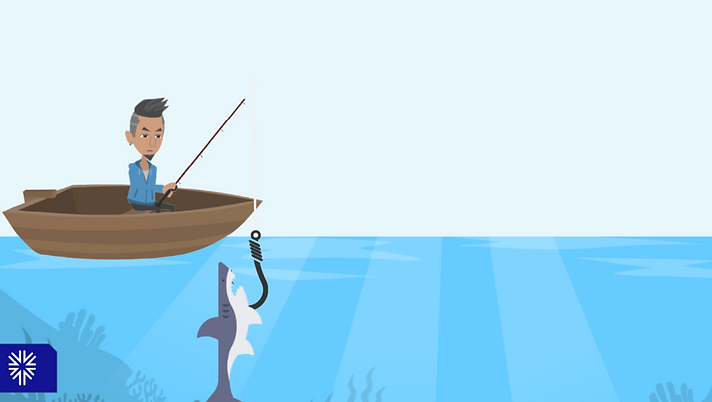
Fishing for facts: catch a fish and learn about Phishing.

Factoids gained as a reward for catching fish.
Breakdown and Ideation
The first step I take when updating a course is to create a document breaking down everything in the current course. Taking down structure, visuals and transcribing the script. From here I’ll take notes on any adjustments I believe are needed, as well as putting together proposals for interactive segments, before feeding back to my expert colleague.
This is the point at which updating and creating from scratch reconverge, in which my colleague will pass me along a final script and I’ll start with creation.
From an interaction perspective, this is the stage at which I am researching and coming up with ideas for on theme interaction. For one example, when working on a phishing and social engineering course I came up with a fishing game, in which the learner would fish up a box of fish, each with a different definition. This came from looking at existing fishing games, such a game seen in Club Penguin in which the hook is controlled by the users mouse, avoiding undesirable fish to get the largest score possible.
In my version, there are no fish you need to avoid and the score and fail states are also stripped out. This is so the interaction remains approachable to all ages, as more of a pallet cleanser than an attempt to add difficulty. The only real difficulty comes from avoiding getting the same fish repeatedly, but this only wastes time. This interaction hit the goal of staying on theme, while adding in a unique element that breaks up the monotony while still educating.
Animation
I’ll go through the course, section by section, animating the videos in Vyond. This starts with blocking the animations, then filling in detail and matching the animations to the audio, getting feedback throughout. The goal is to create animations that are memorable and tell a story, in addition to being educational.

Interactions
For the interactive sections the idea is to create something that connects both to the content and breaks up the repetitiveness of watching videos. They share most of their assets with the animations on Vyond, but can include custom assets from Adobe Illustrator. These are created in Storyline. For the interactive sections the idea is to create something that connects both to the content and breaks up the repetitiveness of watching videos. They share most of their assets with the animations on Vyond, but can include custom assets from Adobe Illustrator. These are created in Storyline.
Interactions are created in Storyline, which uses triggers instead of code.
Limitations
Adding any complex interactions poses an interesting challenge, as Storyline is created to be easy to use for less technical people, but has severe limitations, such as the method for writing code is generally limited to using “triggers”, which are generally very restricting. There is also no way to comment code, categorise it outside of the way the software wants to, and no real way to call functions, or anything else you would normally do to organise code.
As such everything has to be as clear as possible in the way it can be controlled, such as properly naming variables, especially as all variables are global, so names need to include what section they are assigned to. All interactive sections have to be fully planned, in order to avoid a mess of unmaintainable triggers, even more so as the lack of functions means repeated actions need to be duplicated fully and any changes need manually applied to every repeat.
In addition to this, the program is not designed for this complexity of interactions. It can lack basic interactions, such as tracking mouse up or mouse down, the native ability to make timers, or adjustable Z-order or true masking. There is an ability to control items by mouse, through a more recently added javascript functionality, which is unfortunately poorly documented, but mouse tracking breaks collisions between objects, so a work around involving calculation mouse position and item size is needed to be used instead of the built in collisions.
What this means is that every interaction has to consider the software's limitations, and creative solutions have to be used to work around. An example of this is when I needed to make a short interaction about biometrics. This interaction asked the user to “Put themselves in frame”, or in other words, they had to move a mouse controlled phone around the screen to find a smile face, then keep it in frame for 3 seconds.
Simple enough, just have a phone PNG with a hole in the middle (the camera screen) which follows the users mouse. Mask the smiley face whenever its not in the middle of this camera, then unmask it when its withing the “Cameras” view.
Except Storyline has no native masking. And I can’t set the face to invisible when the camera isn’t touching it and visible when it is, the face is too large and the phone to wee, there was a good chance the edge of the face would overhang. Googling provides no solution either, no one does this complexity in Storyline. More Googling. I come across people who have used an item called a Scrolling Box to create a mask.
A Scrolling Box allows text and images to be scrolled within a page. Items within the box are hidden, if they do not fit within the viewing area. The work around people are using is to start an item outside the viewing area, without triggering it to make scroll bars, then animating them in when needed. The only real issue is, Scrolling Boxes and the items within act as a group.
So I took this idea, and combined it with what I know about making items collide and move in javascript, which I figured out many projects ago. The face exists withing the scrolling box when the slide starts, but then immediately chooses a random place on the screen to live. The scrolling box then moves from the top left corner to its position below the transparent PNG of the phone. However, every time it moves, the smiley face will do a calculation so it can stay steady, even though its reference point is constantly moving. After that all I had to do was add code detecting when the screen and face overlapped, and then I had a working interaction, all I had to do was pretty it up.

Collision between the fish and the hook has to be indirect. When the fish reaches the line of detection a Storyline trigger will set a relevant variable to true. Seperately the hook is reporting its position via Javascript (mouse position + ( hook image height / 2) and mouse position - (hook image height/2)). If the hook is overlapping a fishes y-direction it sets another variable to true. If both are true, a fish is caught.

Interaction asking the player to put themself in frame. This reinforces biometric security.

The smiley risks being seen beyond the edge of the phone

Smiley stability calculation
Testing
During and after creation, the course is tested internally. The course is iterated upon until everyone is happy with it before it is uploaded.
Upload
I am then responsible for outputting and uploading the course to both the OSP website and our partners. This involves exporting the course in segments, setting up the pages on the website and testing to make sure the course goes up properly.
Advertising
The final step to this process is advertising the course on Linkedin and Youtube. I make a short, humorous video in the existing style the company uses, then post this via Youtube embed on Linkedin.